

Salesforce search gets you to the record. But it rarely gets you to the answer.
A rep may find the account in seconds, then spend the next ten minutes checking notes, cases, activities, Slack threads, and previous updates to understand what is actually happening.
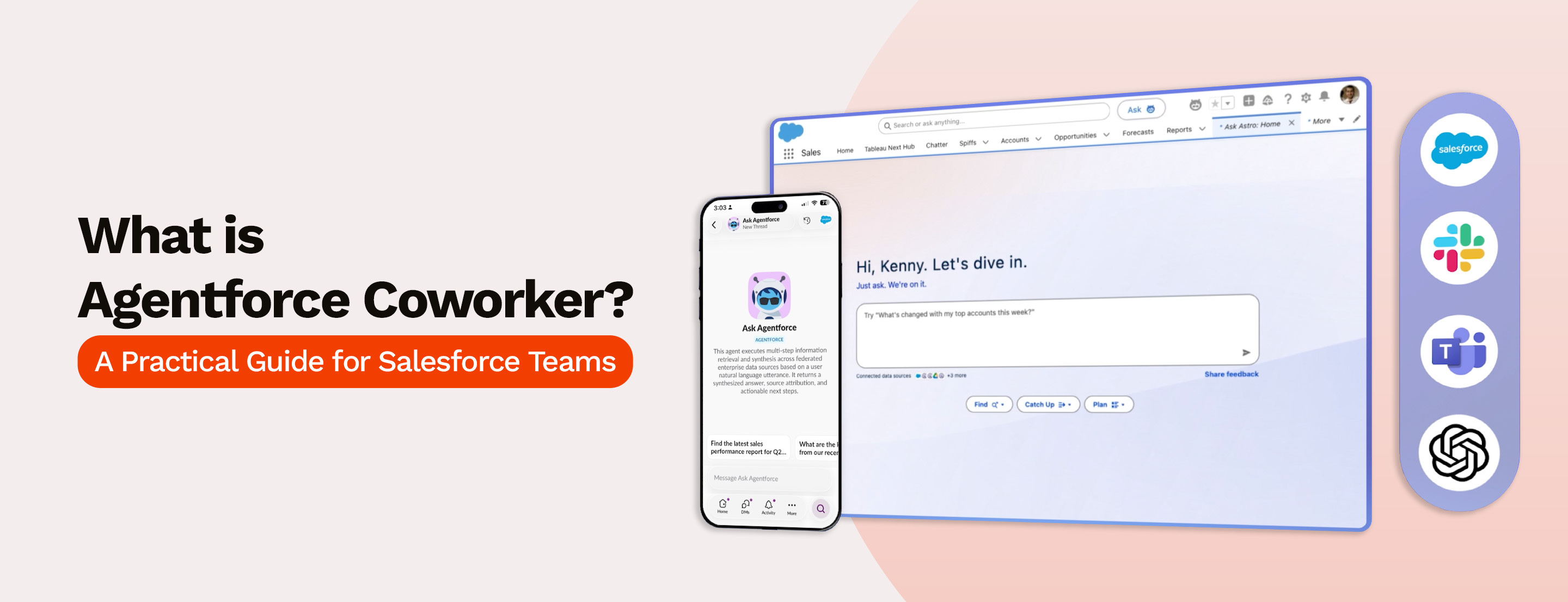
Agentforce Coworker is designed to close that gap. It brings AI into Salesforce search so users can ask questions, surface context, and move from finding information to acting on it.
This blog explains what Agentforce Coworker is, how it works, and why it matters for Salesforce teams preparing for AI-assisted work.
Agentforce Coworker is an AI assistant inside Salesforce search that helps users ask questions, find business context, and understand what action may be needed next.
It expands search beyond record lookup. Instead of only searching for an account, opportunity, case, or contact, users can ask work-related questions and get answers based on Salesforce data, Slack, and connected enterprise sources.
Agentforce Coworker is built for context, not just discovery. It helps Salesforce users find the record, understand the situation behind it, and reduce the manual effort of checking notes, cases, activities, and internal conversations separately.
Agentforce Coworker is currently available as a Beta capability, so teams should treat availability, setup, and rollout planning as subject to change.
Traditional Salesforce search helps users find records.
That is useful, but it still leaves the harder part to the user: opening the right records, reading through related lists, checking notes, reviewing case history, scanning activities, and asking teammates for missing context.
Agentforce Coworker changes the role of search. Instead of only helping users locate information, it helps them understand what the information means.
Here’s the difference in simple terms:
The real difference is not speed. Traditional search may already help users reach a record quickly. Agentforce Coworker becomes useful after that point, when users need the story behind the record.
Agentforce Coworker becomes useful when users know the question but do not know where the answer is stored. Since it can work with Salesforce data, Slack, and connected enterprise sources, its strongest use cases are around context-heavy work.
Before a customer call, sales reps check the account, opportunity, activities, notes, and open cases to understand the latest situation.
Agentforce Coworker can make this easier. A rep can ask, “What should I know before my next call with this account?” and quickly review deal movement, support issues, customer concerns, and internal updates.
Reps get a clearer view before the conversation, especially when account history sits across multiple records and team updates.
Pipeline reviews take longer when managers only look at numbers. A deal may look healthy in a report, but the latest activity, customer issue, or missing next step may tell a different story.
A manager reviewing the pipeline can ask, “Which opportunities need attention this week?” and identify deals with delayed activity, open customer issues, unclear ownership, or no next step.
Sales leaders and RevOps teams can spot follow-up needs faster without opening every opportunity one by one.
Support agents need background before they respond to a customer. The customer may have raised the same issue before, or the case may connect to a larger account concern.
Instead of starting from scratch, an agent can ask, “Has this customer reported this issue before?” and review past cases, repeated problems, escalations, and related account details.
With that context, agents can respond more carefully instead of treating every case as a fresh issue.
Customer success teams often step in after sales, onboarding, support, or renewal conversations. A single record may not show the full customer story.
A CSM can ask, “What changed with this customer since the last business review?” and review recent cases, adoption concerns, stakeholder activity, renewal risks, and internal notes.
Handoffs become easier because CSMs are not depending only on manual updates from sales or support teams.
Useful context often sits outside Salesforce records. Teams may discuss it in Slack, store it in shared documents, capture it in meeting notes, or mention it in internal updates.
A user tracking an escalation can search for something like, “Find internal updates related to this escalation.”
Users can find the right context even when they do not know where it was discussed or stored.
Leaders do not always need another dashboard. Sometimes, they need a quick answer behind a customer, deal, or escalation.
A leader can ask, “Which strategic accounts have active escalations?” and review customer risks, renewal concerns, support issues, and opportunity context.
Salesforce becomes more useful in moments where leaders need to know what deserves attention first.
Across these use cases, Agentforce Coworker helps teams spend less time hunting for context and more time acting on it.
Agentforce Coworker sounds simple from the user side. Ask a question, get context, move ahead.
But the quality of that experience depends on what is happening behind the search bar. If the CRM is messy, permissions are too broad, or connected sources are poorly managed, the answers may create more confusion than clarity.
Agentforce Coworker can only work with the data available to it. If account records are outdated, opportunity notes are missing, cases are poorly categorized, or contact roles are incomplete, the context it surfaces may be weak.
Before rollout, teams should review the basics:
Clean data does not mean perfect data. It means the most important customer, deal, and support information is reliable enough to be used in daily decisions.
Agentforce Coworker can work with Salesforce data, Slack, and connected enterprise sources where configured.
That does not mean every source should be connected on day one. Teams need to decide which sources actually add value. For example, Slack may help with internal updates, while shared documents may help with contracts, onboarding notes, or project files.
The goal is not to connect everything. The goal is to connect the sources that help users answer real work questions faster.
AI search is only useful when access is controlled properly.
Sales, service, support, leadership, and operations teams should not always see the same information. Some records may include financial details, customer escalations, legal notes, or internal-only discussions.
Before enabling Agentforce Coworker widely, admins need to review permission sets, user access, source-level visibility, and data governance rules. This is especially important because AI can make information easier to find. If access is too broad, sensitive context may become easier to surface than intended.
Data 360 plays an important role in connecting and managing external data sources for Agentforce Coworker.
Teams should look at how their Data 360 setup is structured, which data model objects are available, which fields are searchable, and how metadata is defined.
This matters because search quality depends on how well the source is prepared. A poorly structured source may still be connected, but it may not return useful answers.
Agentforce Coworker should not be treated as a casual feature rollout.
Teams need clear rules around:
Good governance keeps AI search useful without making it difficult to govern.
Users need to understand how to ask better questions.
Searching “Acme account” and asking “What changed with Acme since the last renewal discussion?” are very different behaviors. Teams should train users on practical prompts, strong use cases, limitations, and when they still need to verify information manually.
The success of Agentforce Coworker will depend not only on setup, but also on whether users know how to work with it properly.
Agentforce Coworker can involve credit consumption depending on licensing, usage, permissions, and connected data activity.
Before rollout, teams should understand how access is licensed, which actions consume credits, and how usage will be tracked over time.
Teams can avoid surprises by understanding credit consumption, licensing structure, and usage tracking before rollout rather than after.
Agentforce Coworker can be valuable, but it needs the right foundation. Clean data, controlled access, useful sources, strong governance, and trained users will decide whether it becomes a helpful AI coworker or just another feature inside Salesforce.
Agentforce Coworker can change how teams use Salesforce search, moving it from simple record lookup to faster context discovery. But its real value depends on how ready your Salesforce environment is behind the scenes.
If your data is clean, systems are connected, permissions are clear, and workflows are well-structured, AI-assisted search becomes far more useful in daily work.
For many teams, this is where the conversation naturally moves from “Should we use Agentforce Coworker?” to “Is our Salesforce setup ready for it?” MIDCAI’s AI consulting services can help answer that question by reviewing the data, integrations, permissions, and workflows that AI-assisted search will depend on.
Get your Salesforce org ready for AI-assisted search.

5+ years of experience across content, social media, and growth marketing. At MIDCAI, I focus on turning complex ideas around AI, data, and technology into clear insights and campaigns that help businesses attract and engage the right audience.
Get in touch with us for any enquiries and questions
Define your goals and identify areas where technology can add value to your business
We are looking for passionate people to join us on our mission.
where your skills fuel innovation and your growth powers ours
.jpg)